
K116 Game APK Download Latest Version 2026 For Android
Now
14 MB
V1.1.50
Android 5+
2000k+
Description
Mobile gaming has become a popular way for people to enjoy digital entertainment. Many Android users look for gaming applications that offer different activities, simple navigation, and convenient account management in one place. K116 Game is a name that users may come across while exploring online gaming platforms. It is presented as a mobile gaming option for people interested in exploring different types of digital games through an Android device.
Before downloading any third-party gaming application, users should understand how the platform works, what features it provides, and whether it is suitable for their needs. Checking the application source, permissions, privacy information, and payment conditions is also important. This guide explains the commonly relevant aspects of K116 Game, including its introduction, features, APK download process, installation, registration, login, deposit, withdrawal, advantages, disadvantages, and frequently asked questions.
If you are searching for information about K116 Game APK Download Latest Version 2026, this article will help you understand the basic steps and important things to consider before using the application. Related Games: BB6 Bet Game, JZ 92 Game, 8557 Game.
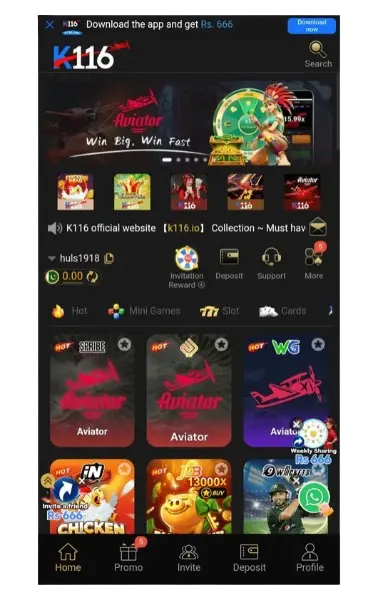
What Is K116 Game?
K116 Game is an online gaming application name associated with mobile-based gaming entertainment. It is intended for users who prefer accessing gaming activities through their Android smartphones rather than using a desktop computer. Mobile applications can make it easier to access account-related sections, explore available games, and manage settings from one place.
The platform’s actual game selection, payment facilities, supported devices, and availability may depend on the version and official service provider. Therefore, users should check the latest information from a verified source before creating an account or installing the APK file.
One important thing to understand is that online gaming platforms are not necessarily suitable for everyone. Some gaming applications may include paid activities, deposits, or other financial features. Users should carefully review the applicable terms and conditions and avoid treating gaming as a guaranteed source of income.
K116 Game Features
Features are an important part of any mobile gaming application. They influence how users navigate the platform and interact with its different sections. The following points describe features that users should examine when evaluating K116 Game.
Mobile-Friendly Interface
A straightforward interface can make an application easier to understand. Users generally prefer clearly arranged menus, readable text, and accessible options. A mobile-friendly design can also make navigation more convenient on different Android screen sizes.
Gaming Categories
Users often explore gaming applications because they want access to different entertainment options. If K116 Game provides multiple gaming categories, users can explore the available sections according to their interests. However, the actual categories should be checked within the application before downloading.
Account Management
Account management is another important aspect of an online platform. Users should be able to understand how account information, login details, and profile settings are managed. Always use accurate information and avoid sharing account credentials with other people.
Simple Navigation
Navigation plays an important role in the overall user experience. Clearly labelled sections can help users locate available options without unnecessary confusion. A well-organized layout also makes it easier for new users to understand the application’s basic structure.
Android Compatibility
Android compatibility is an important consideration before installing an APK. Different devices use different Android versions and hardware configurations. Users should check the application’s stated system requirements and ensure that their device supports the available version.
Account Security
Account security should always be considered when using an online gaming application. Users should create a strong password, avoid sharing verification codes, and never provide sensitive information through unofficial websites or messages.
Convenient Access
Mobile applications allow users to access supported features through their smartphones. This can be useful for people who prefer mobile-based entertainment. However, users should maintain a healthy balance between gaming and their daily responsibilities.
K116 Game APK Download Latest Version 2026
Downloading an APK file requires attention because third-party applications are not always distributed through official app stores. Before downloading K116 Game, users should confirm that the website is authentic and that the application file has not been modified.
Follow these general steps:
- Open the verified website associated with the K116 Game application.
- Find the official download section.
- Check the application name and available version.
- Review the Android compatibility requirements.
- Read the available permissions and privacy information.
- Select the APK download option if the file is provided by a trustworthy source.
- Wait until the download process is completed.
- Scan the downloaded file using a reputable mobile security application before installation.
Users should avoid downloading APK files from unknown advertisements, suspicious links, or websites that do not provide reliable information about the application.
Important: APKChoice.pk does not guarantee the authenticity or safety of third-party APK files. Always verify the source before downloading or installing an application.
How to Install K116 Game on Android
After downloading an APK file, the next step is installation. Android devices may display a warning when an application comes from outside the Google Play Store. This is a security feature designed to help users understand the potential risks of installing external applications.
Here is the general installation process:
- Open the Downloads folder on your Android smartphone.
- Locate the K116 Game APK file.
- Tap the file to begin the installation process.
- Review the Android security warning.
- Continue only if you trust the source and have verified the file.
- Follow the instructions displayed on your screen.
- Wait for the installation to finish.
- Open the application if the installation completes successfully.
If Android blocks the installation, do not disable important security protections just to install an unknown file. First investigate the reason for the warning and verify the APK’s authenticity.
How to Register on K116 Game
Registration is generally the first step for users who want to access account-based features on an online gaming platform. The exact registration requirements for K116 Game should be checked through its verified application or official website.
The general registration process may include the following steps:
- Open the K116 Game application.
- Look for the Register or Sign Up option.
- Enter the information requested by the platform.
- Provide a valid contact method if required.
- Create a strong and unique password.
- Carefully read the user agreement and privacy policy.
- Complete any verification process provided by the service.
- Submit the registration details if you agree with the applicable terms.
Do not enter false personal information or use another person’s identity. If the platform requests sensitive information without explaining why it is needed, investigate its legitimacy before continuing.
How to Login to K116 Game
Users who have already created an account may be able to access it through the login section. Login procedures are usually straightforward, but the available options can vary between application versions.
Follow these general instructions:
- Open the installed application.
- Find the Login option on the main screen.
- Enter your registered username, phone number, or other required account identifier.
- Type your password carefully.
- Complete additional verification if requested.
- Select the Login button.
- Wait for the account dashboard to appear.
If you cannot access your account, check your internet connection and confirm that your login information is correct. Avoid repeatedly entering passwords on suspicious pages.
How to Recover a Forgotten Password
For users who forget their passwords, the platform may provide a password recovery option. If available, select Forgot Password and follow the instructions.
Use only the official recovery process. Never share your password or one-time verification code with someone claiming to provide technical support.
How to Deposit on K116 Game
Some online gaming applications may provide payment or deposit features. However, users should confirm whether K116 Game currently supports deposits and understand the applicable financial conditions before transferring money.
If an official deposit option is available, the general process may look like this:
- Open your verified account.
- Navigate to the Wallet, Balance, or Deposit section.
- Review the available payment methods.
- Check the minimum and maximum transaction limits.
- Read any applicable fees and conditions.
- Confirm the recipient and payment details independently.
- Proceed only if the payment method and platform are verified.
- Keep the transaction receipt for your records.
Never transfer money to a personal account simply because someone on social media or a messaging application requests it. Also, avoid depositing money to unlock a promised withdrawal without independently verifying the platform’s terms.
How to Withdraw from K116 Game
Withdrawal facilities are an important consideration for any platform that accepts deposits or displays a monetary balance. Before requesting a withdrawal, users should understand the platform’s policies and confirm whether the displayed balance represents withdrawable funds.
If K116 Game provides an official withdrawal facility, the general steps may include:
- Log in to your account.
- Open the Wallet or Withdrawal section.
- Review the available withdrawal methods.
- Check the minimum withdrawal amount.
- Read the processing time and applicable fees.
- Enter the requested information carefully.
- Review the transaction details before submitting.
- Save the confirmation or transaction reference.
A displayed balance does not automatically mean that money can be withdrawn. Promotional credits, bonuses, restricted balances, and other conditions may affect withdrawal eligibility.
If a withdrawal is delayed, contact the platform through its verified support channel. Do not pay additional money to an unknown person who promises to release your funds.
Is K116 Game Easy to Use?
Ease of use depends on the application’s design, performance, and organization. A platform with clearly labelled menus can be easier for new users to understand. Similarly, accessible account settings and understandable instructions can improve the overall experience.
Before using K116 Game, users should explore its interface and check whether important sections are easy to locate. They should also examine the application’s performance on their particular Android device.
An application that works smoothly on one smartphone may not perform the same way on another. Internet connectivity, available storage, Android version, and device specifications can all influence performance.
Things to Check Before Using K116 Game
Before installing or creating an account, consider the following points:
Application Source
Confirm where the APK file comes from. Avoid websites that provide misleading download buttons or redirect users to unrelated pages.
Privacy Policy
Read the privacy policy to understand what information the application collects and how that information is used or shared.
App Permissions
Check whether requested permissions are relevant to the application’s functionality. Be cautious if an entertainment application requests unnecessary access to personal files, contacts, or other sensitive information.
Payment Conditions
If financial features are available, understand all payment rules, transaction limits, fees, and withdrawal conditions before depositing money.
Customer Support
Check whether the service provides identifiable and accessible customer support. Be careful with unofficial representatives who request passwords or verification codes.
Responsible Gaming
Online gaming can involve financial risks, particularly when paid activities are available. Never use borrowed money, essential household funds, or money needed for important expenses. Set personal limits and stop if gaming becomes difficult to control.
Advantages and Disadvantages of K116 Game
Every online gaming platform has certain aspects that users should consider before deciding whether to use it. The following table provides a general overview of possible advantages and limitations.
| Advantages | Disadvantages |
|---|---|
| Designed around mobile-based access | Availability may depend on the APK source |
| Can provide access to account features | Third-party APK files may carry security risks |
| May offer different gaming categories | Stable internet may be required |
| Smartphone access can be convenient | Device compatibility can vary |
| Account-based features may be available | Registration may require personal information |
| Can be explored for digital entertainment | Paid gaming activities may involve financial losses |
| Mobile interface may simplify navigation | Actual features require independent verification |
Is K116 Game Safe to Download?
Application safety is one of the most important things to consider before downloading an APK. Since applications distributed outside official app stores may not receive the same review process, users should be particularly careful.
There is not enough independently verified information here to guarantee that K116 Game is safe, secure, licensed, or financially reliable. Therefore, users should not assume that an application is trustworthy simply because its download page looks professional.
Consider these precautions:
- Download applications only from verified sources.
- Scan APK files before installation.
- Review the requested permissions.
- Avoid applications that request unnecessary personal information.
- Never share passwords or verification codes.
- Read the privacy policy and service terms.
- Do not deposit money unless the service and payment arrangements have been independently verified.
Taking these precautions can help users make more informed decisions about third-party Android applications.
Common Problems and Their Possible Solutions
Users may sometimes experience problems when downloading, installing, or accessing mobile applications. Here are a few common situations and general troubleshooting suggestions.
K116 Game APK Not Downloading
If the APK file does not download, check your internet connection and available device storage. Also confirm that the download website is working and that your browser is not blocking the file.
Application Not Installing
Installation problems may occur because of an incompatible Android version, an incomplete APK download, or a conflict with an existing application. Check the system requirements and verify the file before trying again.
K116 Game Not Opening
Restart your smartphone and check whether the application has an available update from a verified source. You can also check your device storage and internet connection.
Login Not Working
Confirm that your account details are correct. If you have forgotten your password, use the official recovery option if one is provided.
Payment or Withdrawal Problems
Keep the transaction details and contact the platform through its verified support channel. Do not send additional payments to unofficial representatives to resolve a transaction issue.
Tips for New K116 Game Users
If you are exploring K116 Game for the first time, a few basic precautions can make the process easier and more secure.
- Understand the Application: Explore the available menus and read the instructions before using any account-based feature.
- Protect Your Account: Create a unique password and do not share your login details with other people.
- Check Updates: Install updates only from verified sources and review what changes are included.
- Review the Rules: Read the application’s terms and conditions before registering or using any paid feature.
- Manage Your Time: Set reasonable gaming limits and make sure entertainment does not interfere with work, education, or personal responsibilities.
- Avoid Financial Pressure: Never borrow money or deposit essential funds for gaming activities. No gaming application can guarantee financial returns.
FAQs
K116 Game is a name associated with an Android-focused online gaming application. Users should verify its current features and official availability before downloading it.
If a verified source provides an Android APK, visit that source, check the version and system requirements, and follow its download instructions. Scan the file before installation.
The application is discussed as an Android gaming option, but current device compatibility and official availability should be confirmed through a verified source.
If registration is supported, open the application, select Register, provide the requested information, create a password, and complete any required verification.
Open the application, select Login, enter your registered account details, and follow the displayed instructions.
The availability of deposit facilities should be confirmed within the verified application. Review payment methods, limits, and conditions before making any financial transaction.
Withdrawal availability and eligibility depend on the platform’s actual policies. Check the official withdrawal terms and confirm whether your balance is eligible.
Whether the APK is offered without a download charge depends on its distribution source. However, free installation does not necessarily mean that every feature or activity is free.
Its safety cannot be guaranteed without independent verification. Users should check the APK source, permissions, privacy policy, and security information before installation.
Final Words
K116 Game is an Android gaming application name that users may encounter while exploring mobile entertainment platforms. Before downloading it, users should investigate its official availability, application features, compatibility, privacy information, and security requirements.
This guide has covered the general information associated with K116 Game, including APK downloading, installation, registration, login, payment considerations, possible withdrawal procedures, advantages, disadvantages, and common questions.
Remember that an application’s availability does not automatically establish its safety or reliability. Always verify the source, understand the terms, protect your personal information, and avoid financial risks. Make informed decisions before installing or using any third-party gaming application.
Disclaimer: This article is published for informational and educational purposes only. APKChoice.pk is not the developer or official operator of K116 Game and does not guarantee its availability, safety, licensing, payment services, or financial results. Users are responsible for checking applicable laws, platform terms, and security risks before using third-party applications.