
999Q Game APK – Download, Registration, Login, Features
Just Now
12 MB
V1.1.50
Android 5+
1500k+
Description
The 999Q Game is a mobile gaming platform that attracts Android users who want access to different online entertainment options through a single application. Its simple interface, account-based access, game categories, and mobile-friendly design can make it convenient for users who prefer playing from their smartphones. As with similar third-party gaming APK platforms, however, the available games, promotions, payment options, and app versions may change over time.
For Android users, APK-based platforms can be useful when an application is not available through the Google Play Store. At the same time, installing an APK from an unknown source can create security and privacy risks. That is why users should check the source carefully, review the requested permissions, and avoid entering sensitive information into an unverified application.
This guide explains what users should know about 999Q Game, including APK installation, registration, login, possible features, game categories, wallet and payment considerations, account security, troubleshooting, advantages and disadvantages, and responsible gaming practices. Must Try: Khush Win Game, K777 Game, G999 Game.
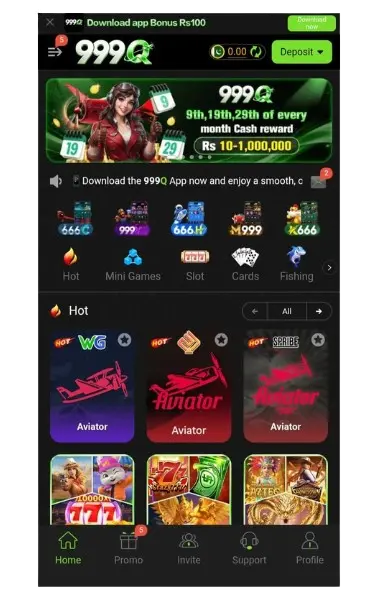
What Is 999Q Game?
999Q Game is presented as an Android-oriented online gaming platform where users can access multiple entertainment options from one account. Instead of relying on a single game, platforms in this category commonly organize different types of games and features within one application.
The interface is generally designed for smartphone users, with navigation focused on important sections such as games, account information, wallet-related options, promotions, and customer support. The exact layout can differ depending on the APK version or website providing the application.
One important point is that third-party APK information can change quickly. A feature mentioned on one website may not be available in another version. Users should therefore verify the current application details before downloading, registering, depositing money, or using any financial feature.
999Q Game APK Download
Before downloading a 999Q APK file, users should first verify where the file comes from. Unlike applications distributed through official app stores, third-party APK files do not always receive the same level of review.
A safer approach is to:
- Find a reliable and clearly identified source.
- Check whether the website provides information about the APK version.
- Review the file name and download details.
- Avoid suspicious pop-ups and unnecessary redirects.
- Scan the downloaded file with a trusted security solution.
- Check Android permissions before completing installation.
- Do not install modified files from unknown sources simply because they promise extra rewards or features.
Users should also keep in mind that the safest option is always an official distribution channel when one is available.
How to Install 999Q Game APK on Android
If the application is distributed outside Google Play, Android may prevent installation until the user allows APK installation from the relevant source.
The general process is:
Step 1: Download the APK
Download the APK only from a source you trust. Make sure the file corresponds to the application you intended to install.
Step 2: Check the File
Before opening the file, review its name and source. If the download has an unusual extension or asks you to install additional unknown applications, stop the process.
Step 3: Allow Installation
Depending on your Android version, you may need to allow installation from the browser or file manager being used. Android settings can vary between manufacturers.
Step 4: Install the Application
Open the APK file and follow the installation instructions shown on your device.
Step 5: Review Permissions
After installation, check the permissions requested by the application. Be cautious if an entertainment app requests access that does not appear necessary for its basic operation.
Step 6: Open and Verify
Launch the application and confirm that its name, interface, and features match the source from which you downloaded it.
If anything appears suspicious, uninstall the application rather than entering your personal or financial information.
999Q Game Registration
Registration is usually required before users can access account-based features. The exact registration process can vary depending on the current version of the platform.
A typical process may involve:
- Open the 999Q application.
- Select the Register or Sign Up option.
- Enter the required account information.
- Create a strong password.
- Add any required verification information.
- Review the platform’s terms and conditions.
- Complete registration.
Avoid using the same password that you use for your email, banking, or social-media accounts. If the platform supports additional account-security options, enabling them can provide another layer of protection.
999Q Game Login
After registration, users can normally access their account through the login page.
A standard login process may require a registered username, phone number, email address, or another account identifier along with a password.
If login fails, check:
- Whether the username or phone number is correct
- Whether the password was entered correctly
- Whether the application is updated
- Whether your internet connection is stable
- Whether the service is temporarily unavailable
Never share your password, verification code, PIN, or wallet credentials with another person claiming to provide technical support.
Features of 999Q Game
The exact features of 999Q can vary by version, but platforms in this category commonly focus on convenience and multiple entertainment options.
Multiple Gaming Options
A major attraction of these platforms is the possibility of accessing different games through one application. Instead of downloading several unrelated applications, users may find multiple categories within the same interface.
Simple Navigation
A straightforward layout can make it easier to move between the home screen, game categories, account section, wallet, and other features.
Mobile-Friendly Experience
The platform is designed around smartphone usage, which can make it convenient for Android users who prefer smaller screens and touch-based controls.
Account-Based Access
Users can create an account and access their information through a personal login. This can make account management easier, but it also means users should take account security seriously.
Wallet Features
Some versions or related platforms may provide wallet sections for deposits, withdrawals, balances, or transaction records. Availability depends on the current platform and region.
Promotional Offers
Gaming platforms may advertise bonuses, promotional campaigns, or other offers. Users should always read the conditions before accepting an offer because eligibility requirements and restrictions can apply.
Games Available on 999Q
The game selection is one of the areas that can change most frequently. Different versions or sources may advertise different categories.
Potential categories on similar platforms can include:
- Card-style games
- Casino-style games
- Slot-style entertainment
- Arcade games
- Prediction-based games
- Multiplayer options
- Number-based games
- Live-style gaming sections
However, users should not assume that every category is available in every version of 999Q. The current application should be checked before making decisions based on advertised features.
999Q Game Wallet and Payments
If 999Q includes wallet or money-related features, users should treat them with additional caution.
Before making any transaction, check:
- Available payment methods
- Minimum and maximum transaction limits
- Processing times
- Applicable fees
- Withdrawal conditions
- Verification requirements
- Promotional restrictions
- Local legal requirements
Never send money to a personal account simply because someone claims to be an agent or representative of the platform. If payment information is unclear, it is better to stop and verify the details first.
Users should also maintain transaction records. Screenshots, receipts, and confirmation messages can be useful if a transaction needs to be reviewed later.
Is 999Q Game Safe?
Safety depends largely on the specific APK file, its source, the permissions it requests, and how the platform handles user information.
There is no universal guarantee that every APK carrying the same name is legitimate. Third-party websites can distribute different versions, modified files, or outdated applications.
Before installation, consider these questions:
- Is the source clearly identified?
- Does the download page provide useful information?
- Is the APK version clearly stated?
- Does the application request excessive permissions?
- Does the platform explain how personal information is handled?
- Are payment terms clearly presented?
- Can users find genuine support information?
If the answer to several of these questions is unclear, avoid installing or using the application.
Privacy Considerations
Privacy is particularly important when an application requires account registration or financial information.
Users should avoid providing unnecessary personal information. Before registration, check the platform’s privacy policy if one is available.
Good security habits include:
- Use a unique password.
- Avoid sharing login details.
- Do not save sensitive information on public devices.
- Log out from shared phones.
- Keep Android updated.
- Avoid suspicious links sent through messages.
- Do not give verification codes to strangers.
- Monitor account activity regularly.
If an application requests access to contacts, messages, photos, microphone, or other sensitive information without an obvious reason, carefully consider whether that permission is appropriate.
How to Choose a Reliable 999Q APK Source
Choosing the download source is one of the most important steps.
A reliable source should provide clear information instead of making unrealistic promises. Look for details about the application, version, installation requirements, and privacy practices.
Avoid websites that:
- Promise guaranteed profits
- Claim that users cannot lose money
- Force several unrelated downloads
- Use excessive redirects
- Ask for banking passwords
- Request unnecessary verification codes
- Offer suspiciously high rewards without clear conditions
- Provide modified APKs without explaining what was changed
Remember that a professional-looking website does not automatically prove that an APK is safe.
Advantages of 999Q Game
There can be several potential advantages for users who prefer mobile gaming platforms.
Convenient Mobile Access
An Android-based application can provide quick access from a smartphone without requiring a desktop computer.
Multiple Entertainment Options
Having several game categories in one application can be more convenient than switching between different platforms.
Simple Account Management
A single account can make it easier to manage preferences and platform-related information.
User-Friendly Interface
A clean interface can help new users understand the basic navigation more quickly.
Regular Updates
Some platforms release updated versions to improve compatibility or introduce changes. Users should still verify every update before installing it.
Disadvantages of 999Q Game
There are also potential disadvantages.
Third-Party APK Risks
Downloading applications outside official stores can increase exposure to malicious or modified files.
Changing Features
The available games, promotions, payment methods, and interface can change without notice.
Financial Risk
If the platform includes real-money features, users can lose money. No game or promotional offer should be treated as guaranteed income.
Limited Verification
Information published by third-party websites may not always be independently verified.
Regional Restrictions
Certain gaming or financial features may not be available everywhere and may be subject to local laws.
Common 999Q Game Problems and Solutions
Users can occasionally experience technical problems while installing or accessing an APK.
APK Will Not Install
Check whether the APK is compatible with your Android version and whether there is enough storage space. If the file is corrupted, download it again from a trusted source.
Application Crashes
Restart the device and check whether an updated version is available. Clearing the application’s cache can sometimes help.
Login Does Not Work
Verify your credentials and internet connection. If you forgot your password, use the official recovery process rather than relying on an unknown third party.
Game Does Not Load
Check your connection first. Some features may also be temporarily unavailable because of server maintenance.
Payment Is Pending
Do not repeatedly submit the same transaction. Check the transaction record and contact the platform through its verified support channel.
Responsible Gaming Tips
If 999Q includes games involving money or chance, responsible use is essential.
Set a budget before playing and never use money needed for food, rent, bills, education, or other important expenses.
Useful habits include:
- Set a spending limit.
- Set a time limit.
- Do not chase losses.
- Avoid borrowing money to play.
- Take regular breaks.
- Do not play when angry or emotionally upset.
- Never assume a previous result guarantees the next result.
- Stop if gaming becomes difficult to control.
Most importantly, treat money-based gaming as entertainment rather than an income source.
999Q Game and Financial Expectations
One of the biggest misconceptions surrounding gaming APKs is the idea that they can provide guaranteed earnings.
No game can guarantee winnings. Results can depend on chance, game mechanics, platform rules, and other factors. Promotional language should therefore be evaluated carefully.
Users should never make financial decisions based solely on claims such as “guaranteed profit,” “fixed winning,” or “risk-free income.”
If a platform involves real money, users should only participate with funds they can afford to lose and should understand the applicable terms before making a transaction.
How to Keep Your 999Q Account Secure
Account security should remain a priority from the moment of registration.
Use a password that is difficult to guess and different from passwords used on other websites. Do not share login credentials through WhatsApp, social media, email, or phone calls.
Also avoid clicking login links received from unknown sources. Scammers can create fake pages that look similar to legitimate login screens.
If you believe someone has accessed your account, change your password immediately and use the platform’s official support or recovery process.
999Q Game Updates
Keeping an application updated can improve compatibility and may introduce bug fixes or security improvements. However, users should not install every new APK automatically.
Before updating:
- Confirm the source.
- Check the version information.
- Review what has changed.
- Back up important account information where appropriate.
- Remove suspicious older files.
- Scan the new APK before installation.
An update should come from a source you trust rather than an unknown message or random download link.
Final Thoughts on 999Q Game
999Q Game may appeal to Android users looking for a mobile platform that brings different gaming and entertainment options into one place. Its potential convenience comes from features such as account access, mobile navigation, game categories, and wallet-related functions.
At the same time, users should approach third-party APK platforms carefully. Application versions, games, payment methods, promotions, and availability can change, while unofficial APK files can carry security risks.
Before downloading 999Q, verify the source, inspect the APK, review permissions, protect your login details, and understand any financial terms. If real-money gaming is involved, never consider it a guaranteed way to earn money. Set limits, understand the risks, and follow the laws that apply in your location.
The safest approach is to make informed decisions rather than relying on promotional claims. A little verification before installation can help protect both your device and your personal information.
Frequently Asked Questions About 999Q Game
999Q Game is an Android-focused gaming platform that may provide access to multiple online entertainment and gaming options through a single account. Available features can vary by version and source.
You can download the APK from a source you trust. Before installing it, verify the file, check its version, review permissions, and scan it with a reliable security tool.
Yes, 999Q is generally discussed as an Android-oriented gaming platform. The exact Android compatibility may depend on the APK version.
Open the application, select the registration or sign-up option, provide the required information, create a strong password, and complete any verification steps requested by the platform.
Open the application and enter your registered login details. If you cannot log in, check your credentials, internet connection, and whether the application is working correctly.
The available games can change between versions. Depending on the current platform, users may find card-style, casino-style, arcade, slot-style, prediction, or other entertainment categories.
Some versions or related platforms may provide wallet and payment features. Users should verify the currently available payment methods, limits, fees, and withdrawal conditions before making any transaction.
Safety depends on the APK source, file authenticity, requested permissions, and how the platform handles user information. Users should avoid suspicious APK files and never provide passwords or verification codes to unknown individuals.
If the application is distributed as an APK, Android may allow manual installation outside Google Play after the appropriate installation permission is enabled. Only install files from sources you trust.
Check your Android version, available storage, APK compatibility, and whether the downloaded file is complete. If the file appears corrupted or suspicious, obtain a verified version instead.