
7A Game APK Download 2026 – Complete Guide for Android
Just Now
12 MB
V1.1.35
Android 5+
2500k+
Description
7A Game is a mobile gaming platform that Android users may come across when looking for different online games and entertainment options. The platform is designed around a mobile-friendly experience, allowing users to access gaming features through an Android device. However, before installing any APK, it is important to understand where the file comes from, what permissions it requests, and whether the current version is compatible with your phone.
For users in Pakistan, the process of downloading and installing an APK can be slightly different from installing an application directly through Google Play. An APK file is normally installed manually, so users should pay attention to the source and avoid downloading files from unknown websites. A reliable download source can also reduce the risk of receiving an altered or outdated application.
This guide explains the important things to know about 7A Game APK, including its general features, Android installation process, account registration, login, available gaming categories, wallet-related options, bonuses, security considerations, troubleshooting, and frequently asked questions. Since app features and availability can change, users should always check the latest information provided by the platform before using an account or wallet feature.
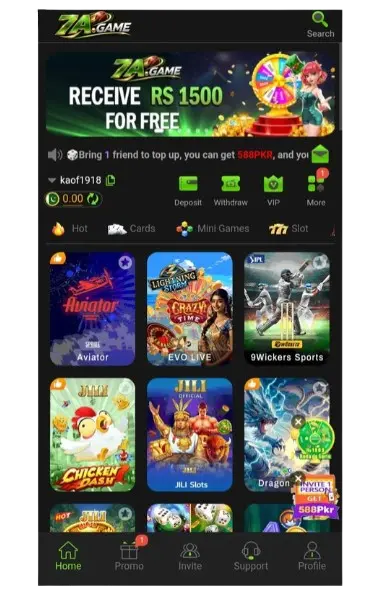
What Is 7A Game?
7A Game is an Android-focused gaming platform that provides access to different types of online entertainment through a mobile interface. Depending on the current version and availability, users may find several gaming categories and account-related features within the platform.
The main attraction of an APK-based gaming platform is convenience. Instead of using a desktop computer, Android users can access the application directly from their smartphones. This can make it easier to browse games, manage an account, and check available features from one place.
At the same time, an APK should not be treated like an ordinary file downloaded from anywhere on the internet. The source matters. An unofficial or modified APK may contain unwanted software, excessive permissions, or changes that are not part of the original application.
Before downloading 7A Game APK, users should therefore check the version number, file source, installation requirements, and privacy information. It is also useful to scan an APK with a trusted security tool before installing it. Related Games: Boo 999 Game, BOO999 Game, 888pkr.
7A Game APK Download
Downloading an APK is generally straightforward, but choosing the correct file is the most important step. Users should avoid websites that repeatedly redirect visitors, display misleading download buttons, or ask for unnecessary personal information.
Before downloading the 7A Game APK, check the following:
- Confirm that the APK is intended for Android devices.
- Check the latest available version.
- Make sure the download source is trustworthy.
- Check the APK file size before installation.
- Avoid modified or cracked versions.
- Scan the downloaded file with a reputable security application.
- Keep enough free storage available on your phone.
It is also worth remembering that an APK available on a third-party website may not always represent the latest official release. If the platform provides an official download source, that should generally be checked first.
How to Install 7A Game APK on Android
Once the APK file has been downloaded, Android users can normally install it manually. The exact menu names may vary depending on the phone manufacturer and Android version.
Step 1: Download the APK
Download the current APK file from a source you trust. Do not open files received from unknown messages, random advertisements, or suspicious links.
Step 2: Open the Downloaded File
Go to your phone’s Downloads folder and locate the APK. Tap the file to start the installation process.
Step 3: Allow Installation if Required
Some Android versions block installations from sources other than Google Play. If this happens, Android may ask you to allow the browser or file manager to install unknown applications.
Only enable this permission when you understand where the APK came from. After installation, you can disable the permission again from your Android settings.
Step 4: Install the Application
Follow the instructions displayed on the screen and wait for the installation to finish.
Step 5: Open 7A Game
After installation, open the application and check whether it loads correctly. If the app immediately closes or shows an error, the APK may be incompatible, corrupted, or outdated.
7A Game Registration
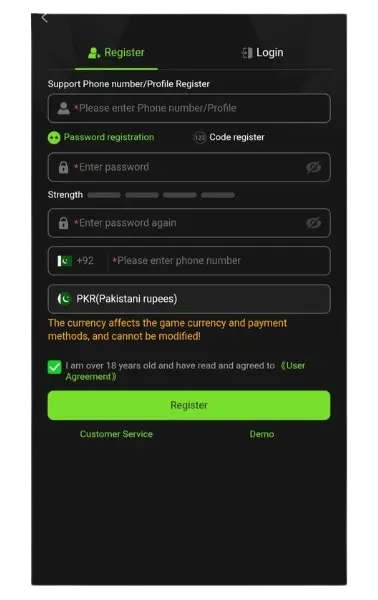
New users generally need to create an account before accessing account-specific features. The registration process can vary depending on the current platform version.
A typical registration process may require information such as a mobile number, username, password, or another account detail. Users should only provide information through the legitimate platform interface.
When creating a password, avoid using simple combinations such as your name, date of birth, or commonly used numbers. A strong and unique password is safer, especially if the account contains wallet or transaction information.
Before completing registration, read the available terms and conditions. Pay particular attention to age requirements, promotional conditions, account rules, and restrictions that may apply in your region.
7A Game Login
Existing users can normally access their account through the login section of the platform. Enter the registered account details carefully and avoid sharing your password with another person.
If you are using a public or shared device, do not save your login details in the browser or application. Logging out after use can also help protect your account.
If the login does not work, first check whether the username and password were entered correctly. If you have forgotten your password, use the platform’s available account recovery method rather than relying on unofficial services.
Games Available on 7A Game
The exact games available through 7A Game can depend on the current version, region, and platform availability. Gaming platforms of this type may provide several categories rather than focusing on a single style.
Users may encounter categories such as:
Slot-Style Games
Slot-style games generally use reels, symbols, and different combinations. Some may include themes, animations, bonus rounds, or other visual elements.
The rules and payout structures can vary significantly between individual games, so users should read the game information before playing.
Card-Based Games
Some gaming platforms also provide card-based formats. These may have different rules, interfaces, and playing methods depending on the particular title.
Users should understand the rules before placing any real-money stake where applicable.
Number-Based Games
Number-based formats may use selected numbers, draws, or other random outcomes. Because results can be unpredictable, users should not assume that a previous result guarantees a future outcome.
Quick-Play Games
Mobile platforms often include quick games designed for shorter sessions. These may be simple to access but can still involve financial risk if real-money participation is available.
The important point is that availability can change. A game shown in one version may not necessarily appear in another version or in every region.
7A Game Bonuses and Promotions
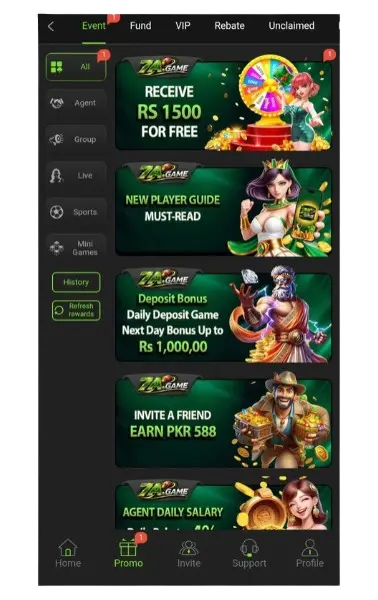
Promotional offers can be one of the reasons users explore online gaming platforms. Depending on the current promotion, users may see welcome offers, deposit-related promotions, referral rewards, daily activities, or other incentives.
However, a bonus should never be considered the same as withdrawable cash.
Before accepting any promotional offer, read its conditions carefully. Important details may include:
- Minimum deposit requirements
- Wagering or turnover conditions
- Maximum withdrawal limits
- Expiration dates
- Eligible games
- Account verification requirements
- Restrictions on multiple accounts
- Bonus cancellation rules
A promotion can appear attractive at first but still have conditions that affect how it can be used. Reading the full terms before accepting an offer is therefore important.
7A Game Deposit Options
If the platform supports real-money gaming, users may find a wallet or deposit section inside their account. Available payment methods can vary depending on location and the current platform configuration.
Before making a deposit, verify the account details and transaction information carefully. Do not send money to an individual simply because someone claims to represent the platform.
Users should also keep transaction records, including confirmation messages and reference numbers. These can be useful if a payment is delayed or requires verification.
Never deposit more money than you can comfortably afford to lose. A gaming balance should not be treated as a source of guaranteed income.
7A Game Withdrawal
Withdrawal availability and processing times depend on the platform’s rules and the selected payment method. Some platforms may require account verification before allowing withdrawals.
Before requesting a withdrawal, check:
- Whether your account has been verified.
- Whether the minimum withdrawal requirement has been reached.
- Whether any bonus conditions remain active.
- Whether your payment information is correct.
- Whether the selected withdrawal method is supported.
If a withdrawal takes longer than expected, check the transaction status first. Keep screenshots or transaction references if you need to contact customer support.
Never pay an unknown person an extra fee simply because they promise to unlock or accelerate a withdrawal.
7A Game Security and Privacy
Security is one of the most important issues when installing an APK. An application installed outside an official app store deserves extra attention because users may not have the same level of verification available through a major app marketplace.
Before installation, review the permissions requested by the application. Ask yourself whether each permission makes sense for a gaming application.
For example, unnecessary access to contacts, messages, microphone, or other sensitive information should be treated carefully.
Some basic security practices include:
- Download APK files only from trusted sources.
- Avoid modified or cracked applications.
- Keep Android updated.
- Use a reputable mobile security solution.
- Use a unique account password.
- Do not share login credentials.
- Avoid entering payment information on suspicious pages.
- Log out from shared devices.
- Check the application’s permissions regularly.
If an application behaves unusually after installation, such as displaying excessive pop-ups, redirecting to unrelated websites, or requesting unexpected permissions, consider uninstalling it and scanning the device.
7A Game Android Requirements
The requirements for running 7A Game can vary depending on the application version. In general, Android users should make sure their phone has enough free storage, a stable internet connection, and a reasonably current Android operating system.
Before installing the application, check:
- Android version compatibility
- Available storage
- Internet connection
- Device performance
- Application permissions
- APK file size
A device with very limited storage or an outdated Android version may experience installation or performance problems.
Why 7A Game May Not Install
There are several reasons why an APK may fail to install.
Insufficient Storage
If your phone does not have enough free space, Android may stop the installation. Delete unnecessary files or applications and try again.
Incompatible Android Version
An APK designed for a newer Android version may not work correctly on an older device.
Corrupted APK
An interrupted or incomplete download can damage the APK. Downloading the file again from a trusted source may solve the problem.
Unknown Source Restriction
Android may prevent installation when the browser or file manager has not been granted permission to install unknown applications.
Existing Application Conflict
If an older version is already installed, there can sometimes be a conflict between the old and new packages. In that situation, users should first make sure their account information is safely stored before changing or reinstalling the application.
Common 7A Game Problems and Solutions
App Keeps Crashing
Restart your phone and reopen the application. If the issue continues, clear the application’s cache and check whether a newer version is available.
Login Problem
Check your username and password carefully. If the credentials are correct but the issue continues, use the official recovery or support option.
Slow Loading
A weak internet connection can cause pages and games to load slowly. Try switching between Wi-Fi and mobile data to identify whether the connection is responsible.
APK Installation Error
Check storage, Android compatibility, and the integrity of the downloaded file. Avoid downloading random versions from multiple websites.
Withdrawal Delay
Check the withdrawal status and review the platform’s stated processing conditions. Keep the transaction reference available if customer support needs it.
Is 7A Game Safe?
Safety depends on several factors, including the authenticity of the application, its current security practices, the download source, and how users handle their personal and financial information.
It would be inaccurate to assume that every APK carrying the 7A Game name is genuine. Third-party websites can distribute files that are outdated or modified.
For this reason, users should verify the source before installation and avoid files that appear suspicious. They should also review permissions and scan the APK where possible.
If real money is involved, users should additionally check the platform’s terms, age restrictions, withdrawal rules, privacy information, and whether its services are legally available to them.
Responsible Gaming
Online games involving money can lead to losses, and there is no reliable way to guarantee a particular outcome. Previous wins do not guarantee future results.
Users should establish a spending limit before playing and avoid increasing deposits simply to recover previous losses. Borrowing money for gaming is also risky.
Take regular breaks and stop if gaming starts interfering with work, studies, family responsibilities, sleep, or finances.
A gaming platform should be approached as entertainment rather than as a guaranteed way to make money.
Tips Before Using 7A Game
A few simple checks can make the overall experience safer:
- Check the source: Do not install an APK simply because it appears in a search result.
- Check the version: Old versions may have compatibility or security issues.
- Read the rules: Understand account, bonus, deposit, and withdrawal conditions before using those features.
- Protect your password: Never send your login details to another person.
- Keep records: Save important transaction references and account-related confirmations.
- Watch permissions: Be cautious if an application asks for access that does not appear necessary.
- Set a budget: Only use money that you can afford to lose if real-money gaming is available.
7A Game Pros and Cons
| Pros | Cons |
|---|---|
| Mobile-focused gaming experience | APK sources can vary in reliability |
| Convenient access from Android devices | Features may change between versions |
| Multiple gaming categories may be available | Some features may not be available in every region |
| Account and wallet features may be included | Real-money gaming carries financial risk |
| Easy manual APK installation | Unknown APK files can create security concerns |
Frequently Asked Questions
7A Game is an Android-oriented online gaming platform that may provide different games and account-related features. Availability can vary by version and region.
Download the APK only from a source you trust. Before installing it, verify the version and scan the file if possible.
If the current APK supports your Android version, it can generally be installed manually. Device compatibility should be checked before installation.
Common reasons include insufficient storage, an incompatible Android version, a corrupted APK, or Android’s unknown-source restrictions.
Promotional features can change over time. If a bonus is available, read its complete terms before accepting it because conditions may apply.
If the current platform supports real-money withdrawals, the process will depend on its account and payment rules. Verification and minimum withdrawal conditions may apply.
No APK should automatically be considered safe simply because it uses the same application name. Always verify the download source and inspect permissions before installation.
No gaming outcome should be treated as guaranteed. Results can be uncertain, and users can lose money when real-money gaming is involved.
Final Words
7A Game can be an option for Android users looking for a mobile gaming platform, but the most important step is to verify the application before installing it. APK files downloaded from unknown sources can create security and privacy risks, so users should pay attention to the source, version, permissions, and device compatibility.
The same care should be applied to registration, bonuses, deposits, and withdrawals. Read the relevant terms before using account or wallet features, keep your login information private, and maintain records of important transactions.
Most importantly, if the platform involves real-money gaming, treat it as entertainment rather than a guaranteed income opportunity. Set a reasonable budget, understand the risks, and stop if gaming begins to affect your finances or everyday responsibilities.